


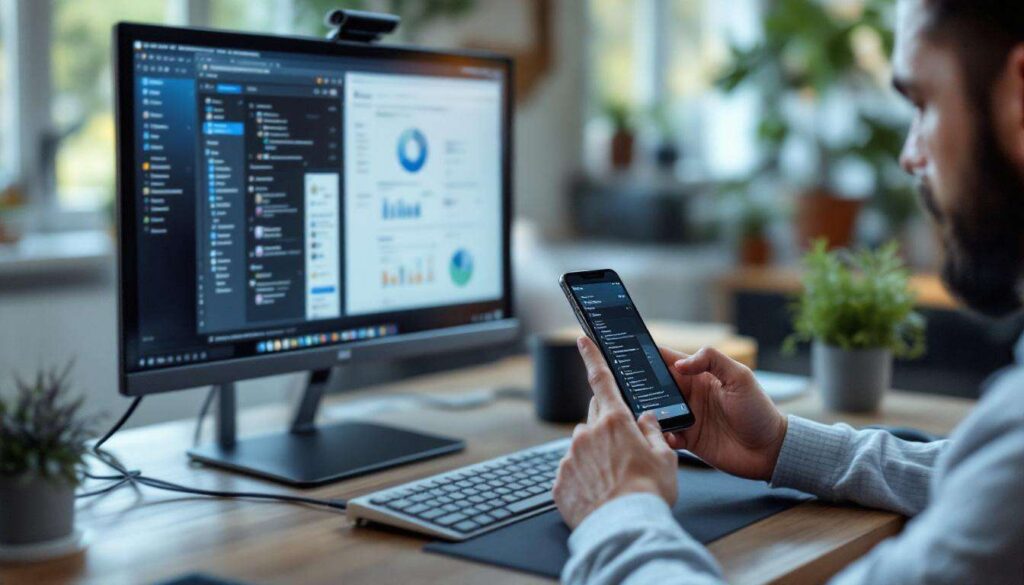
The promise of replacing a traditional PC with a smartphone has captivated technology enthusiasts for years. As mobile devices become increasingly powerful, manufacturers and software developers have invested considerable resources into positioning smartphones as viable alternatives to desktop computers. Yet despite remarkable advances in processing power, display technology, and connectivity, the vision of a single device serving all computing needs remains elusive. The gap between aspiration and reality reveals fundamental challenges that extend beyond mere technical specifications, touching upon ergonomics, software ecosystems, professional requirements, and sustainability concerns.
The evolution of smartphones and their increased power
Processing capabilities matching desktop performance
Modern smartphones now incorporate processors that rival mid-range desktop computers in raw computational power. The latest mobile chipsets feature multi-core architectures with dedicated neural processing units, enabling complex tasks such as video editing, 3D rendering, and artificial intelligence applications. Manufacturers have successfully miniaturised technology that once required substantial cooling systems and power supplies, delivering impressive performance within pocket-sized devices.
Memory and storage advancements
Contemporary flagship smartphones routinely offer specifications that were unthinkable a decade ago:
- RAM configurations reaching 12GB or more, supporting extensive multitasking
- Internal storage options exceeding 512GB, accommodating vast media libraries
- Fast UFS storage technology enabling rapid data access and transfer speeds
- Cloud integration providing virtually unlimited expansion capabilities
These hardware improvements have transformed smartphones into genuinely capable computing platforms, yet hardware alone cannot bridge the gap to full PC replacement. The technical foundation exists, but implementation challenges persist across multiple dimensions.
The current technical limitations of smartphones
Thermal management constraints
Despite impressive specifications, smartphones face inherent physical limitations that desktop computers avoid. The compact form factor restricts cooling capabilities, forcing processors to throttle performance during sustained workloads. Extended video rendering or complex computational tasks trigger thermal protection mechanisms that reduce clock speeds, resulting in inconsistent performance that professionals cannot tolerate.
Battery life versus performance trade-offs
The relationship between power consumption and battery capacity creates unavoidable compromises:
| Task Type | Smartphone Duration | Desktop Equivalent |
|---|---|---|
| Video editing | 2-3 hours | Unlimited (mains powered) |
| 3D rendering | 1-2 hours | Unlimited (mains powered) |
| Software development | 3-4 hours | Unlimited (mains powered) |
Intensive applications drain batteries rapidly, forcing users to remain tethered to charging cables and negating the mobility advantage that defines smartphone appeal. These physical constraints establish boundaries that no amount of optimisation can fully overcome, leading directly to questions about how software adapts to these limitations.
Software compatibility and ergonomics of smartphones
Operating system limitations
Mobile operating systems, whilst increasingly sophisticated, lack the comprehensive functionality of traditional desktop environments. Professional applications often exist in simplified mobile versions with reduced feature sets, or remain entirely unavailable. The file management systems on smartphones prioritise simplicity over flexibility, making complex workflows involving multiple file types and directory structures cumbersome.
Interface challenges for productivity
The touchscreen paradigm, whilst intuitive for consumption, proves less efficient for content creation:
- Precision tasks requiring fine cursor control become frustrating on touch interfaces
- Keyboard input on virtual keyboards reduces typing speed and accuracy
- Screen real estate limitations prevent effective multitasking with multiple windows
- Gesture-based navigation lacks the efficiency of keyboard shortcuts and mouse combinations
Peripheral connectivity issues
Whilst smartphones support external displays, keyboards, and mice through docking solutions, the implementation remains inconsistent. Applications designed for touch interfaces often fail to optimise properly for desktop mode, creating awkward hybrid experiences. The promise of seamless transitions between mobile and desktop environments has yet to materialise in practical, reliable forms. These interface challenges become particularly acute when examining the specific demands placed upon computing devices by professional users.
Specific needs of professional users
Industry-specific software requirements
Professional workflows depend upon specialised applications that rarely exist in mobile-compatible versions. Engineers require CAD software with extensive toolsets, financial analysts depend upon complex spreadsheet functions with macro support, and creative professionals need full-featured editing suites with plugin ecosystems. These mission-critical applications represent years of development investment that cannot be easily replicated on mobile platforms.
Multi-monitor workflows
Many professional environments rely upon multiple display configurations that smartphones cannot adequately support. Traders monitor numerous data feeds simultaneously, designers compare versions across screens, and programmers view code alongside documentation and output. The single-screen limitation of smartphones, even when connected to external displays, restricts productivity in ways that prove unacceptable for professional contexts.
Data security and compliance
Corporate IT departments maintain strict control over computing environments to ensure:
- Compliance with industry regulations regarding data handling
- Consistent security policies across all devices
- Reliable backup and disaster recovery procedures
- Standardised software versions for compatibility and support
The consumer-oriented nature of smartphone platforms makes enterprise-level control more difficult to implement and maintain. Beyond these professional considerations, broader questions about sustainability and economics influence the viability of smartphones as universal computing devices.
Environmental impact and cost of smartphones
Shorter replacement cycles
Smartphones typically require replacement every two to three years due to battery degradation, software obsolescence, or physical damage. Desktop computers, by contrast, often remain serviceable for five to seven years with occasional component upgrades. This accelerated replacement cycle generates substantial electronic waste and consumes resources in manufacturing new devices.
Repairability and upgradeability concerns
Modern smartphones employ integrated designs that prioritise thinness over maintainability. Sealed batteries, soldered components, and proprietary construction methods make repairs expensive and upgrades impossible. Desktop computers allow users to replace failing components, upgrade storage or memory, and extend useful lifespan through incremental improvements rather than complete replacement.
Total cost of ownership analysis
| Component | Smartphone Approach | Desktop Approach |
|---|---|---|
| Initial investment | £800-£1,200 | £600-£1,000 |
| Replacement frequency | 2-3 years | 5-7 years |
| Accessories required | Dock, keyboard, mouse, monitor | Included or one-time purchase |
When calculating the complete cost of using a smartphone as a primary computing device, including necessary peripherals and frequent replacements, the economic advantage disappears. These practical considerations shape the realistic expectations for how smartphone technology might develop.
Future prospects for smartphones as versatile tools
Emerging technologies and hybrid approaches
Rather than complete PC replacement, the industry appears to be moving towards complementary ecosystems where smartphones serve as mobile companions to traditional computers. Cloud-based services enable continuity across devices, allowing users to begin tasks on smartphones and complete them on desktops. This hybrid model acknowledges the strengths of each platform whilst avoiding the compromises inherent in forcing universal functionality into a single device.
Specialised use cases where smartphones excel
Smartphones have established dominance in specific scenarios:
- Mobile content consumption and communication
- Quick reference and information lookup
- Photography and immediate social media sharing
- Location-based services and navigation
- Contactless payments and digital identification
These applications leverage the unique advantages of smartphones rather than attempting to replicate desktop functionality. The future likely involves deepening excellence in mobile-specific domains whilst maintaining interoperability with traditional computing platforms.
The aspiration of replacing personal computers with smartphones reflects understandable desires for simplicity and consolidation. However, fundamental constraints relating to thermal management, battery capacity, software ecosystems, and ergonomics establish boundaries that technological advancement alone cannot overcome. Professional users require capabilities that mobile platforms struggle to deliver, whilst environmental and economic analyses reveal hidden costs in the single-device approach. Rather than universal replacement, the realistic future involves smartphones evolving as powerful mobile companions within broader computing ecosystems, each device optimised for its particular strengths whilst maintaining seamless integration across platforms.